
Crypton

Suture tools and materials catalog
START
10.2014
DURATION
5 months
STATUS
Published for in-house operation
CLIENT
Johnson & Johnson
PLATFORM
iPad
TYPES OF WORK
Application design • content systematization • concept development • merchandising • instruction design
CATEGORY
Enterprise
SUBJECTS
Pharmaceuticals • business • catalog

The application is intended to be used by sales representatives of the client throughout the country. Its main goal is to provide a tool which helps sales representative demonstrate company's products to the client and draw up an application.
The application is designed as a product catalog with an advanced search on set of various parameters, as well as cost and date filtration. All familiar online functions are available in the catalog, including high-resolution images viewing and analogs comparison.
The application is designed as a product catalog with an advanced search on set of various parameters, as well as cost and date filtration. All familiar online functions are available in the catalog, including high-resolution images viewing and analogs comparison.
Application essence
Application Business Task
To speed up the decision-making process of the potential buyer.
Ivan Metelkin
"You are distinguished by full client-oriented approach when immersed in the specifics of the client and what they do. We were surprised and pleased with how quickly you offer solutions and how clearly they match our tasks".
Client review
Ethicon (Johnson & Johnson Division) Senior Product Manager in "Suture surgical materials"
Presenting products in real size
TASK 1
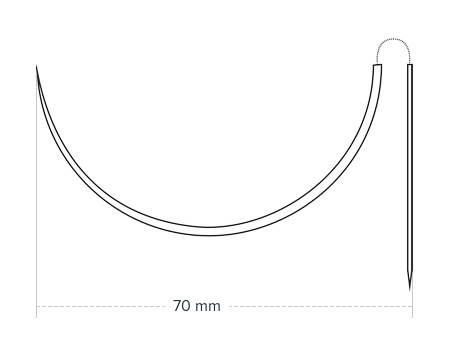
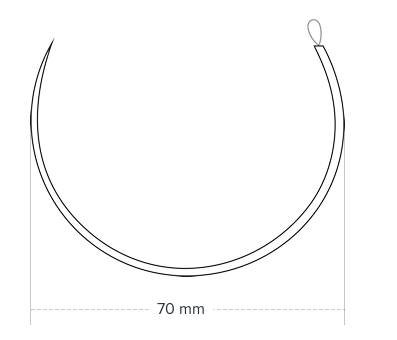
The company's products are suture materials including surgical needles. Size is very important in this case — to millimeters. Potential buyer won't make the right decision about the purchase without seeing the product as it is in reality. Because of this the task was set out to create a catalog in which every needle has an individual card with item description and a real size image.
TASK DESCRIPTION

1,000 needles,
Karl!
Over a thousand needles in real size.
"
The complexity of the problem and its solution
At the very start of the project the client had vector images of needles. The task seemed to be really simple: we just needed to add all necessary values in millimeters using graphic editor.
It's important to note that all the values are specified in pixels, as we're dealing with pixels in programming, design and the device itself. It's meaningless to convey pixels into millimeters directly in this case. The thing is, it's very important to take the number of dots per inch into account on the screen of the end device (ppi).
This figure is different for each model. The number of ppi was 264 on iPad. If the needle is 31 mm long, then the correct number of pixels is 322. This number was obtained by dividing the number of millimeters by the actual size of one pixel on the tablet screen.
After identifying the required ratio, we had to manually (because this work cannot be done automatically) set the required pixel sizes for each of the thousands of products.
It's important to note that all the values are specified in pixels, as we're dealing with pixels in programming, design and the device itself. It's meaningless to convey pixels into millimeters directly in this case. The thing is, it's very important to take the number of dots per inch into account on the screen of the end device (ppi).
This figure is different for each model. The number of ppi was 264 on iPad. If the needle is 31 mm long, then the correct number of pixels is 322. This number was obtained by dividing the number of millimeters by the actual size of one pixel on the tablet screen.
After identifying the required ratio, we had to manually (because this work cannot be done automatically) set the required pixel sizes for each of the thousands of products.
PROCESS

1,000 and 1 needle

Make sure
the catalog is correct
the catalog is correct
TASK 2
There are around two thousand products in the application catalog. Each product has thirty-six characteristics (from needle size to its curvature). At the beginning the client provided us with digital catalog with these characteristics indicated. The final catalog in the application must have been 100% correspondent to the digitized catalog.
Task was complex enough due to the lack of a single standard for most of the values in digitized catalog, so we had to compare both versions of it manually.
Task was complex enough due to the lack of a single standard for most of the values in digitized catalog, so we had to compare both versions of it manually.
TASK DESCRIPTION
2,000
products
Each individual product card has thirty-six characteristics.
"
Typically, testing takes 80/100% of the time in relation to programming. In this case, we allocated one and a half as much time for testing.
PROCESS
time
How we coped with the task
150%
testing
We hope you have enjoyed our story
<Let us take something
off your shoulders>
off your shoulders>
We hope you have
enjoyed our story
<Let us take something off your shoulders>
enjoyed our story
<Let us take something off your shoulders>

Headquarters: Sepapaja 6, Tallinn, Estonia, 15551
Legal information: The Better Bunch OÜ, Registry code: 14037627, VAT # EE102160149, registered under address Sepapaja 6, Tallinn, Estonia, 15551
Legal information: The Better Bunch OÜ, Registry code: 14037627, VAT # EE102160149, registered under address Sepapaja 6, Tallinn, Estonia, 15551
© BetterBunch, 2019
By using our website you are agreeing to our cookie policy and our privacy policy